
NEW PARTNER ONBOARDING INFORMATION*
Welcome to Beantown Baby Diaper Bank (BBDB) Partner Network!
Below are instructions and information about getting started as a partner and distribution information.
Step 1: Set Up Your Human Essentials Account
Human Essentials is the software through which you will request diapers each month.
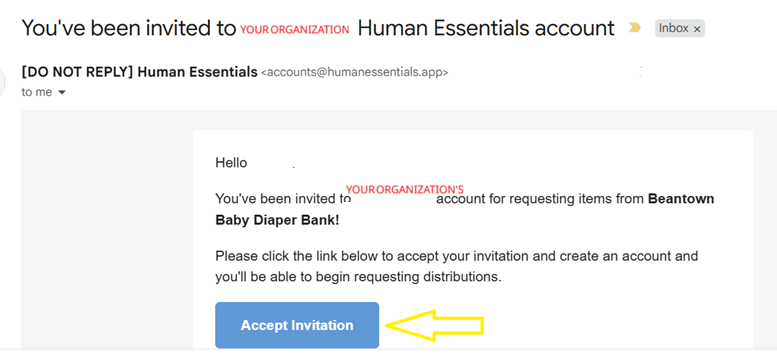
Beantown Baby will send you a Human Essentials Account Invitation email. Check your spam folder if you do not see it in your Inbox.
Subject line will be: “You’ve been invited to [Your organization’s name] Human Essentials Account
Sender’s email will read “[DO NOT REPLY] Human Essentials <accounts@humanessentials.app>”
Please be sure to click “Accept Invitation” button within 24 hours. If the 24-hour window has passed, no worries! Just email rachel@beantownbabydiaperbank.org, and we’ll send you a new invitation.
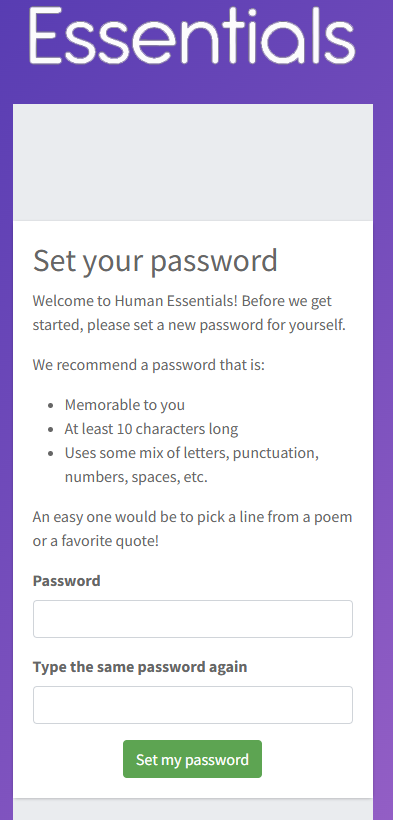
Once you select "Accept Invitation" it should take you to a screen to set your password:
This should enable you to Login to Human Essentials.
NOTE: More than 1 person can have an account on Human Essentials. If you would like someone else to have a Human Essentials account as they may be asked to create a diaper request, please email rachel@beantownbabydiaperbank.org with that individual’s name and email address. They will receive the same email and prompts as noted above.
Step 2: Create Monthly Diaper Request
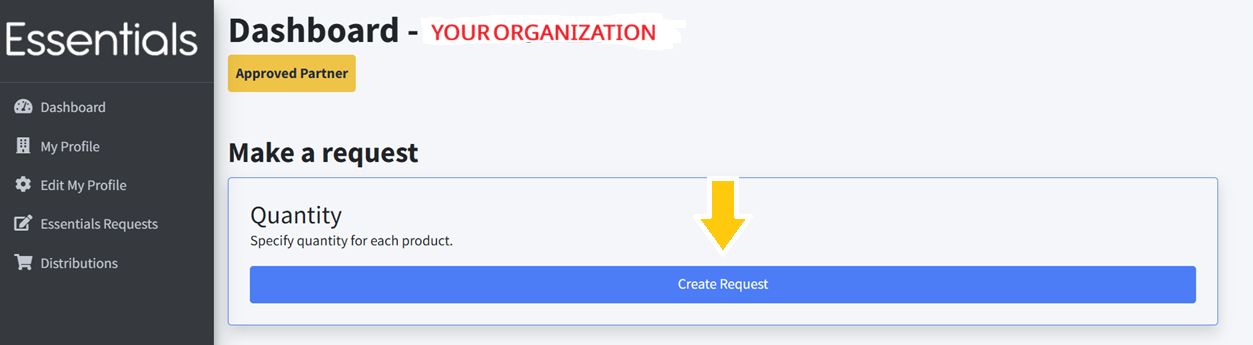
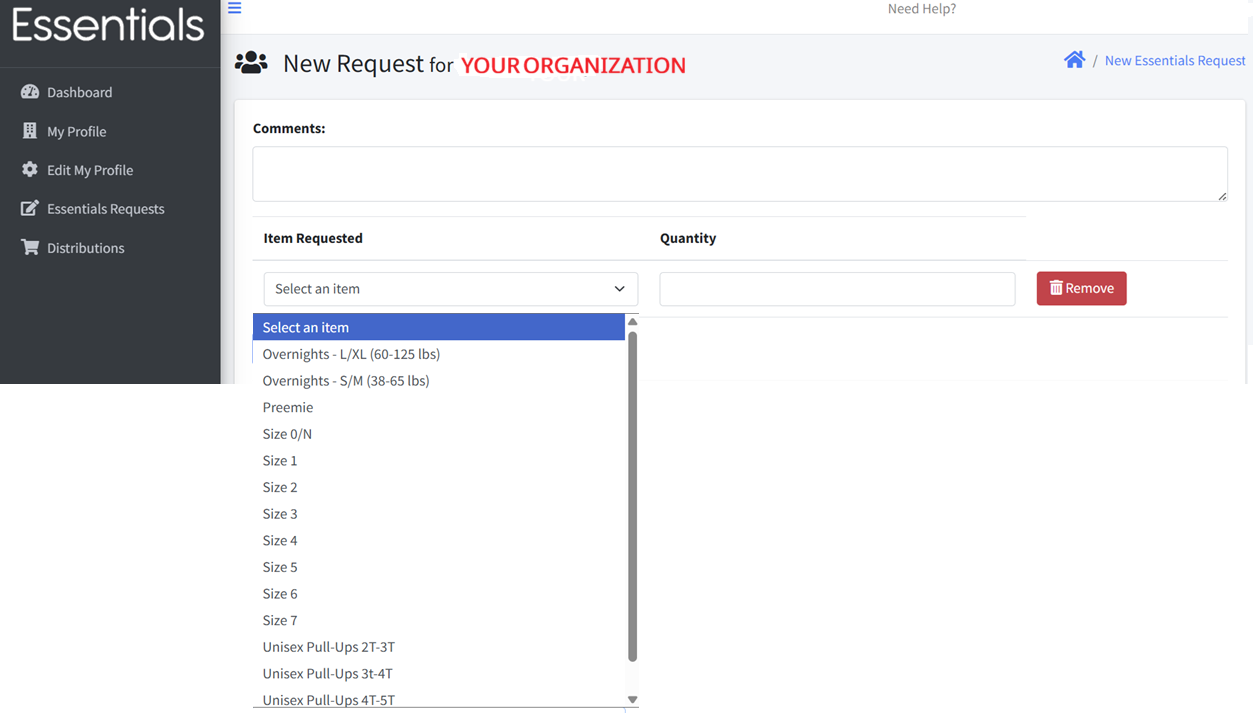
Upon Login, you will be brought to your organization’s Human Essentials Dashboard. Click on the button titled “Create Request” followed by “Select Item” to see dropdown menu of diaper size options.
NOTE: Options for sizes Preemie, Overnight S/M and Overnight L/XL are there, though Beantown Baby does not regularly keep them in inventory. Your organization will receive all or some of those requests only if they are available.
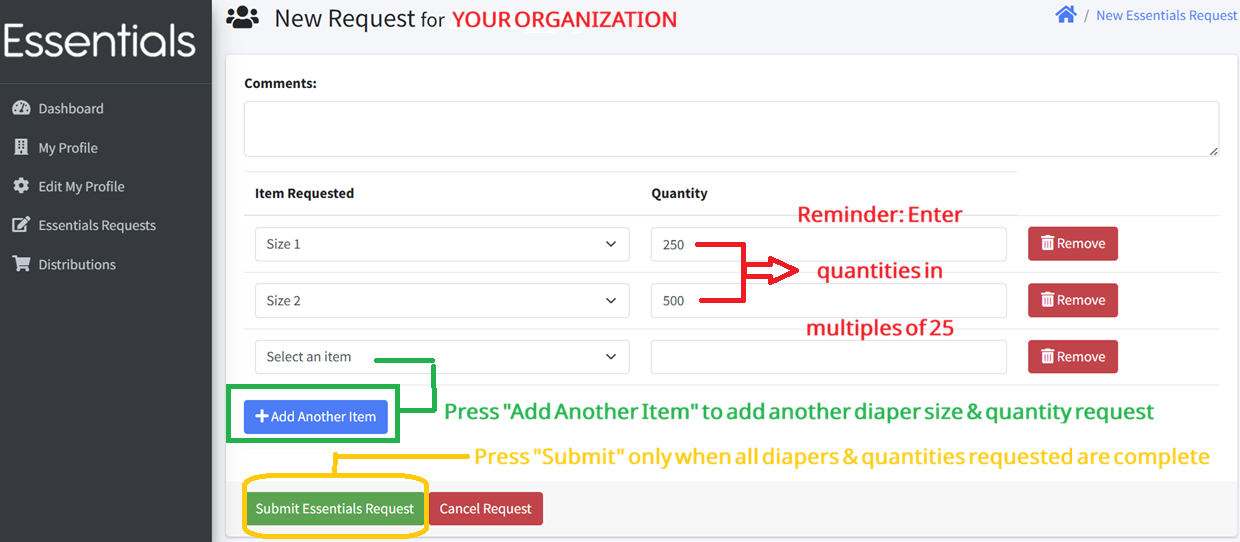
Start by selecting a diaper size, and then write in the quantity requested.
IMPORTANT NOTES regarding quantities requested:
Quantity refers to total number of individual diapers, rather than packs, boxes, # children, etc.
Quantities should be written only in multiples of 25. For example, enter 450 rather than 440 or 460.
Quantities requested can reflect Beantown Baby’s recommendation of providing approximately 50 diapers per child per month.
Examples: If your organization provides Size 1 diapers each month to an average of 5 children, you can request up to 250 Size 1 diapers. If your organization provides Size 2 diapers each month to an average of 10 children, you can request up to 500 Size 2 diapers, and so on.
Once all diaper sizes and quantities requested have been entered, click “Submit Essentials Request" and it will be sent to Beantown Baby. Requests for Sizes N - 7 are generally in inventory and completely fulfilled.
If you need to amend or redo the request after you submitted it, please email rachel@beantownbabydiaperbank.org and she will cancel that diaper request to enable you to create a new one.
Step 3: Monthly Diaper Pick-Up
DISTRIBUTION SCHEDULE & PICK UP LOCATION:
Distribution is on the third Wednesday of each month.
Location: Finnegan Development, 181 Bedford St, Lexington.
Time: Between 10:40 a.m. and 2:00 p.m.
MONTHLY EMAIL REMINDER FROM BEANTOWN BABY
Expect an email from Beantown Baby approximatley two weeks before each distribution date. It will ask for 2 action items:
Request Diaper Sizes & Quantity: The email will include a general link to Log In to Human Essentials and submit your diaper sizes and quantities per the steps outlined above.
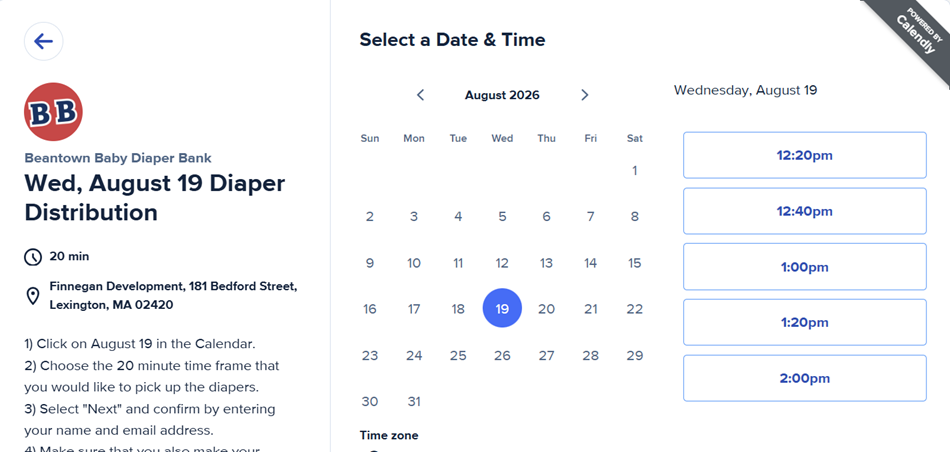
Schedule Pick-Up Time: The email will also include a Calendly link to select your pickup time slot, which will be in 20 minute increments generlaly between 10:40am - 2:00pm. See sample screenshot below.
Please do BOTH of these things - they do not need to be completed at the same time; however, many organizations will first select their pick up time slot in Calendly as it is first-come-first-serve for time slots.
**Please note: This partner onboarding information is intended for your organization only. Please do not forward or share this link with anyone outside your organization.
Thank you for your partnership and for being part of the Beantown Baby community!